Showing posts with label supercollider. Show all posts

Sunday, November 23, 2008

Back in Black

There are several big changes in Sced expected in the near future, so today I'm releasing the latest stable 0.4 version, that does not introduce any new features, but has fixes for a couple of long-standing bugs.

It's worth mentioning however, that this version is a lot more compatible with stock and third-party style schemes for Gedit. That means, that your SuperCollider code is going to look cool and stylish, even with the darkest of them... Oh, and quite a number of themes is already available through this page at GNOME Live. Go and check them out!


One more thing. In order to make your Gedit even more great and powerful, make sure you also get the fullscreen plugin and the gedit-plugins package from your distro. The former enables the fullscreen mode for the distraction-free coding (or some live demos, perhaps), and the latter has some neat extensions like bracket completion and tabbar-disabler for an even cleaner workspace!

The Sced tarball itself is available through the usual location and the Debian/Ubuntu packages should be already in the PPA at the time of writing. Just in case you missed the installation instructions, check the following post for a short tutorial. And, of course, your feedback is much appreciated.

Friday, October 3, 2008

Time for some colliding under Ibex...

Dang, it looks like I write in this blog, only when I publish the new SuperCollider binaries... Anyway, if you're interested in trying the latest (7803) SVN snapshot the easy way, it's now available (for Intrepid as well)!

The instructions for installing the SuperCollider debs (and making some sounds) may be found in an earlier howto, but I also think of writing another introductory tutorial on Synths and SynthDefs in the next few days...

And most importantly, I'm probably going to perform a bit of live SC noise by the end of October. So any comments and tips, esp. from those of you, who have played live with SC/Linux are kindly welcome :)

Wednesday, May 21, 2008

SuperCollider for Human Beings

This time with gedit support!!!

And here's a short hands-on tutorial, just in case anyone would like to try out this extremely efficient synthesis environment for the first time...

UPDATE:The best way to get semi-official SuperCollider packages is the SuperCollider PPA. Check its page for instructions on adding the repository.

After you've successfully added the PPA to your software sources, install supercollider and supercollider-gedit packages.


Then start gedit and open Edit->Preferences. Enable Sced plugin from the Plugins tab:
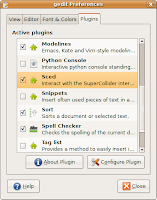

Okay, now we can try the interpreter. Select Tools->SuperCollider Mode from the gedit menu. The SuperCollider output panel will appear with a message that SuperCollider has started. Now type the following code just inside the currently open document:
"Hello, World!".postln;
Make sure that the cursor is on the same line and press CTRL+E. You should see "Hello, World" printed two times in the output window. The string is duplicated because "postln" returned the same string as a value, and the output also prints the results of the evaluated expressions.

If you'd like to get some sound, make sure that JACK is started. If not, start it with qjackctl or the following command:
jackd -d alsa
After JACK has started, select SuperCollider->Start Server from the gedit menu and execute the following code string, just like we did with the "Hello, World" example above:
{SinOsc.ar}.play;
You should hear an annoying beep from your left speaker. Not much, huh? Well, press ESC (Stop Sound) inside gedit for now. And append something like the following code to your document (yes, you can do all the work in the same document):
// This example is a modified patch
// from the SuperCollider book by David Cottle
// You can enable syntax highlighting
// by selecting View->Highlight Mode->Others->SuperCollider
( // press CTRL+E here
{
  RLPF.ar(
    Saw.ar(55),
    LFNoise1.kr([5, 5], mul: 440, add: 880),
    0.1,
    mul: 0.25
  )
}.play;
)
Note the brackets around the actual code. They're used to group code together into "blocks" and execute SuperCollider instructions simultaneously. In this example you will need to press CTRL+E where indicated to select and run our block. Remember, that you can shutdown the sound anytime with ESC! :)

As you can see, we have a Saw oscillator, connected to a resonant low-pass filter (RLPF) here and the cutoff frequency is controlled by an interpolated random value (LFNoise1). You can open reference pages for the respective modules (UGens) by positioning the cursor over them and pressing CTRL+U, but make sure that you install supercollider-doc package to get those.

Well, I hope this tutorial will help you get started with SuperCollider. Make sure you also stop by the SuperCollider website and the wiki for more tutorials and examples.

Friday, April 11, 2008

SuperCollider for Hardy!

Just a quick notice, that I've updated the SuperCollider binaries for Ubuntu 8.04 (Hardy Heron), that's going to be released later this month. This time, the packages are merged with the original 20060416 version as advised by #ubuntu-motu. Also, the supported architectures are extended to powerpc and lpia.

APT sources.list entries:

deb http://ppa.launchpad.net/artfwo/ppa/ubuntu hardy main
deb-src http://ppa.launchpad.net/artfwo/ppa/ubuntu hardy main


Enjoy!

Friday, January 25, 2008

Sced 0.3 released today!

Okay, the blog is reset, and I have just uploaded the Sced 0.3 tarball to its usual location. This release includes awesome contributions by Eckard Riedenklau and requires gedit 2.20 and gtksourceview 2.0 to run. Enjoy!