Monday, May 9, 2011

Hello, Vala!

A while ago I've been playing with Vala. The cool thing about Vala is that it's a cutting edge language which is able to produce programs with similar performance to those written directly in C. Obviously, it may prove to be a perfect language for fast audio-processing tasks, and there already are bindings for JACK, liboil (now removed from PySoy), an ongoing effort to create bindings for libsndfile and probably other libraries, which I overlooked.

For the exercise, I tried to create Vala bindings for liblo, the lightweight OSC protocol library. They're still unpolished, but already usable in a straightforward, almost C-like way:
static void main(string[] args)
{
    Lo.Address t = new Lo.Address(null, "8080");
    Lo.send(t, "/box/grid/led/all", "i", 1);
}
Right now, I'm working on Vala bindings for LV2 and the accompanying Lilv library. For this purpose and for further experiments with LV2 plugins I've created uSynth capsula - a project, which currently provides little more than a functional port of lv2jack host from Lilv source distribution. It does not have any support for plugin GUIs yet, but it's a planned feature. Loading GUIs with SLV2 (a Lilv predecessor) worked to some extent:


Capsula is still in the earliest planning stages and doesn't have a roadmap yet. For now, I'm thinking about a full featured LV2 plugin host, completely controllable by OSC. I don't have any further ideas, but perhaps you have? Then, by all means, feel free to join the fun!

Saturday, April 30, 2011

Natty Release Party: success!

The release party in Gorno-Altaisk turned out to be the best release party we ever had, a really joyful evening. I have no idea how many people came, but the place was certainly full of people, who continued to arrive.

We had the usual bulk of DVDs to give out, a talk about free software and Ubuntu, a talk about the local media environment, and lots of interaction and conversations about Ubuntu and open source. For the entertainment part, there was a Mafia game with a geek theme and some live music, performed under Linux with the monome (actually an arduinome) controller and rove.

Several pictures from the event are below, and the full set is available here (courtesy of the Shum webzine).

Во время лекции о свободном софте Игра в "гик-мафию" Вечеринка Гости интересуются мономом

Thursday, February 24, 2011

Writing PolicyKit applications in Python without D-Bus

I'm always happy when more libraries get Python bindings, and today I've been especially excited by the fact that GObject introspection support for PolicyKit has finally appeared in Natty repositories. Basically it means, that PolicyKit is now accessible from Python through a native API without direct D-Bus communication. I've tried to port the querying example from PolicyKit manual and it did work!

The Python example below is an almost line-by-line port of the original, but it should give you a basic idea on how to use the API for your own scripts.

#! /usr/bin/env python

import sys, os
from gi.repository import GObject, Gio, Polkit

def on_tensec_timeout(loop):
  print("Ten seconds have passed. Now exiting.")
  loop.quit()
  return False

def check_authorization_cb(authority, res, loop):
    try:
        result = authority.check_authorization_finish(res)
        if result.get_is_authorized():
            print("Authorized")
        elif result.get_is_challenge():
            print("Challenge")
        else:
            print("Not authorized")
    except GObject.GError as error:
         print("Error checking authorization: %s" % error.message)
        
    print("Authorization check has been cancelled "
          "and the dialog should now be hidden.\n"
          "This process will exit in ten seconds.")
    GObject.timeout_add(10000, on_tensec_timeout, loop)

def do_cancel(cancellable):
    print("Timer has expired; cancelling authorization check")
    cancellable.cancel()
    return False

if __name__ == "__main__":
    if len(sys.argv) != 2:
        print("usage: %s <action_id>" % sys.argv[0])
        sys.exit(1)
    action_id = sys.argv[1]

    mainloop = GObject.MainLoop()
    authority = Polkit.Authority.get()
    subject = Polkit.UnixProcess.new(os.getppid())

    cancellable = Gio.Cancellable()
    GObject.timeout_add(10 * 1000, do_cancel, cancellable)

    authority.check_authorization(subject,
        action_id, #"org.freedesktop.policykit.exec",
        None,
        Polkit.CheckAuthorizationFlags.ALLOW_USER_INTERACTION,
        cancellable,
        check_authorization_cb,
        mainloop)

    mainloop.run()

In order to run this example, make sure you have the gir1.2-polkit-1.0 package installed and provide an action in the command line, for example:

./polkit-test org.freedesktop.policykit.exec

I suppose, the API is still a little rough on the edges, but it's already usable and I'm going to try it for an upcoming D-Bus service in indicator-cpufreq. Looks like it's perfect time to start moving things to GObject introspection already.

Friday, February 18, 2011

Hello Planet Ubuntu!

Greetings to all the Planet readers! I've become an Ubuntu member today (or was it yesterday in Americas?), and this is my first post on Planet Ubuntu.

My name's Artem Popov and I am an active member of the Russian Ubuntu Translators team. Sometimes, I also help with packaging / bugs and I intend to become a MOTU in the future.

Ubuntu is my favourite distribution for a long time now, because I believe it has many things done right from the very start. Contributing to Ubuntu is a great opportunity to gain new experience and it's always a pleasure to work with such a rocking community.

For now, I am going to continue my work on translations and packages with the MOTU team, but maybe I shall try some other ways of helping out. Fortunately, there are plenty of them!

Friday, December 17, 2010

CPU frequency indicator and DIY merchandise

I have been using Natty since Alpha 1 and I'm very happy with the new Unity desktop. It has surely got its bugs, but I almost love it. The drawbacks are that Unity doesn't support GNOME applets and doesn't seem to have a native application launcher yet. The latter problem is easily fixed by installing either GNOME Do or Synapse. The applets, well... are not a big problem either, because I can't remember using any, except for the clock (replaced by an indicator) and the CPU frequency scaling applet, which had always saved me from all the JACK audio timing issues (with a single click).

There is no indicator for selecting CPU frequency scaling mode, so I decided to write my own. I started with Jono Bacon's tutorial here and used cpufreq-selector D-Bus service (bundled with the Gnome applet) to switch between governors. This functionality is also provided by HAL, but HAL is deprecated in favour of DeviceKit, which doesn't support frequency scaling right now. I think I'll have to add a dedicated D-Bus service in the future to get rid of gnome-applets dependency... And this is how it all currently looks:


Thanks to Quickly, an Ubuntu package was a piece of cake. You can install it from here or grab the source from project page in Launchpad. Please report any issues. Thanks!

Another thing that bothers me, is an almost critical bug with the Ubuntu Beanie Hat from Canonical store. It just cannot stand low temperatures in winter and is unsafe to wear outside. I wonder, if there is a Launchpad project to report bugs against Ubuntu merchandise :) Anyway, I came up with a simple workaround, which works if you're not afraid of DIY:
  1. Get an ushanka.
  2. Attach an Ubuntu button badge (I used a really old one).
  3. Have fun with the new Ubuntu ushanka!

Sunday, May 30, 2010

Better firewire audio support comes to Maverick

Maverick Meerkat development has started with some big changes on the professional audio front. Last week JACK2 (aka jackdmp) has finally replaced the original JACK in Ubuntu. And that's not all! There are FFADO packages, updated to work with the new firewire stack (alias Juju), which in turn is fully supported by the Maverick kernel. The news made me immediately upgrade to Maverick as soon as I've noticed a new libffado source upload in the Maverick changes feed... For now, I am very pleased with the result. But using JACK2 with a Juju-powered backend may require a little bit of work, that I am going to describe below.

First of all, the new FFADO packages currently fail to build on Maverick, because of a Python policy violation (bug 586821). A fix is underway, but I didn't want to wait and built a quick-and-dirty workaround package. If you like workarounds too, feel free to install libffado binaries from my PPA.

Second, to use the new firewire stack, FFADO needs at least libraw1394-2.0.5, which is also missing from Maverick. Hopefully the new version will be merged or synced from Debian soon (bug 586918), but if you don't want to wait again, you can install the package from my PPA as well. That will work.

Next, the old firewire stack has to be blacklisted. Simply edit /etc/modprobe.d/blacklist-firewire.conf to look like:

blacklist ohci1394
blacklist sbp2
blacklist dv1394
blacklist raw1394
blacklist video1394

#blacklist firewire-ohci
#blacklist firewire-sbp2


Finally, run "sudo update-initramfs -k all -u" and reboot. That's it... One thing to remember is that Juju creates device nodes with /dev/fw* paths without write access by default. This is easily fixed by a little udev tweak (example configuration may be found here).

Just to be safe, I also updated my rtirq settings to increase the priority of firewire_ohci IRQ service. It will not make things faster right now, because rtirq requires a realtime kernel, which has not been updated for Maverick (yet).

I like the fact, that all existing JACK applications work without any extra configuration or recompilation. This includes QJackCtl, Qtractor, SuperCollider, JAMin, energyXT... Only Renoise  started to hang and produce bad noises, until I switched the "Realtime audio CPUs" parameter to 1. Most likely it has something to do with JACK's own multicore support.

Some applications may also display strange port names (like firewire_pcm:0500000000000000_Unknown5_out). Luckily, JACK provides port aliases in the "system:playback_N" form. Aliases seem to work transparently for connecting/disconnecting ports, but QJackCtl will only display them if you set the appropriate option in the setup dialog.

Audio streaming is generally stable most of the time, but I've heard glitches with both the internal firewire controller (Ricoh R5C832 rev 05) and an ExpressCard controller (Texas Instruments XIO2200). So, I would not recommend performing live with Maverick right now. Nevertheless, it is great to see the progressing firewire audio support in Ubuntu. Juju migration is one of the Maverick development targets, and there is a blueprint to track the process.

Tuesday, August 18, 2009

Scan Tailor package

I didn't expect this to happen in the Karmic release cycle, and I'm very happy, that I actually managed to do it. Today is the day, when my first package has made its way into Ubuntu! Well, not exactly the first, since I have uploaded several sponsored bugfixes in the past, but this is my first real Ubuntu package made from scratch, that has passed all of the Ubuntu requirements. This would not be possible without people from #ubuntu-motu, who have been constantly helping out and correcting (sometimes really stupid) mistakes! Thank you, guys!

And now I'd like to introduce this little piece of software. It is quite a nice application, called Scan Tailor by Joseph Artsimovich et al. and it's purpose is to cleanup and arrange raw document scans into sets of pages, ready for OCR, assembling into a book or printing. For an idea of what it looks like, here's a couple of screenshots:


In short, if you've been looking for an application for cropping, deskewing and splitting your scans in Linux, well... There is one and a very good one! Also, besides being a very useful tool for anybody digitizing moderate to large amounts of text, Scan Tailor rocks, because it shows the essential signs of a true UNIX app:

  • It does one thing and does it well.
  • It is suitable for processing both tiny and massive amounts of data.
  • It does most of the work for you, yet still allows manual control over everything.
  • It is free and open source.
Last, but not least, it is very friendly and fun to use. And you can try out this amazing application by simply clicking an apturl link, if you have Karmic installed and there are builds for Jaunty in my Launchpad PPA as well. It's still got a picky FTBFS on armel, but I hope, that I shall be able to track it. This is where the things are starting to get really exciting!

Sunday, March 15, 2009

Open source acceleration on r600/r700

Well, this is something that we, Radeon owners, have surely been waiting for. Thanks to the hard work of X.org and Ubuntu developers, an open source driver with 2D and XVideo acceleration support has recently hit the repositories (changelog). But, unfortunately, the driver still depends on kernel support, that has not been uploaded yet.

Anyway, if you don't want to wait for the kernel packages, the X.org wiki has cool instructions on building the latest DRM from source, and they just worked for me like a charm! For some extra confidence, I also did a "depmod -a" and "update-initramfs -u" after copying the modules in their places.

If everything goes well, here's what you'll get in your Xorg.0.log:

(==) RADEON(0): Using EXA acceleration architecture
(II) RADEON(0): Acceleration enabled


And of course, the difference is easily noticeable. Especially if you like moving and switching windows :) The video support is also outstanding. Even high resolution clips (like Big Buck Bunny or the Ruby videos) play VERY smoothly and are quickly switched into and out of fullscreen. Really cool! And they say, EXA acceleration should work with radeonhd as well by now, but I haven't tried this myself yet.

Monday, March 9, 2009

aoTuV Beta5.7

Just in case, you'd like to try out the latest beta on Linux and need a static binary, here's mine - oggenc-aotuvb5d.bz2.

FLAC and Kate support included!

Saturday, January 31, 2009

Python 3.0 / Hex On!

This week, I've started playing with Python 3.0 (aka Py3k). The final 3.0 version had been released in December, so there is only a release candidate available in the Intrepid repositories, but I didn't care. In fact, it was dead easy to install - simply apt-get install python3 and you're all set!

Among the things, that amazed me the most, is a new fractions module (actually existing since Python 2.6), that provides support for rational numbers! What are rational numbers good for? Well, they're invaluable for pretty much anything, that involves just intonation, to say the least!

For example, here's how I've managed to code a simple Hexany generator in almost no time! Roughly speaking, a hexany is created from several prime (or not so prime) numbers, that are multiplied together in pairs to form a set. To get a scale out of it, the resulting numbers should be divided by a chosen "base note" and reduced to the octave range. So, first of all, we'll need a simple octave reduction function:
def octave_range(fr):
    if fr <= 0: raise ValueError("Invalid frequency ratio")
    elif fr > 2: return octave_range(fr / 2)
    elif fr < 1: return octave_range(fr * 2)
    else: return fr
Now, let's define a "base note" and use set comprehension (another Py3k feature) to fill the CPS with permutations of numbers from the Wikipedia example:
nums = [2, 3, 5, 7]
base = 5 * 7
cmps = {a * b for a in nums for b in nums if a != b}
And thanks to the fractions support, the final step is also going to be the easiest:
from fractions import Fraction
hexany = [octave_range(Fraction(note, base)) for note in cmps]
hexany.sort()
The code is also suitable for producing dekanies and other scales, based on Wilson's combination product sets. I still have to figure out the proper ways of using them in music though :P

Monday, January 26, 2009

Updates

There's not much to write about, but here are several quick updates to keep this feed alive... First of all, Sced source code has been moved to the SuperCollider SVN tree, so any further development is going to continue out there... Another good news is that our favourite text editor - gedit is probably going to have some kind of D-Bus interface for the 2.26 release. So things like ScedDocument (and other means of feedback from sclang) could be finally made possible.

I have moved the few Russian posts in this blog into ratzez.blogspot.com, thanks to the Blogger import and export feature. It means, that from now on, I shall continue writing in English here and the secondary blog will be in Russian. Looks like it also makes the Blogger interface more convenient, 'cause the engine does not seem to respect the browser language anyway...

And yet one more thing, just in case you'd like to add a little Human look to your code... It can be done with a couple of Ubuntu-coloured themes for GtkSourceView. They're not quite polished yet, but already seem to nicely fit an all-human environment...

Sunday, November 23, 2008

Back in Black

There are several big changes in Sced expected in the near future, so today I'm releasing the latest stable 0.4 version, that does not introduce any new features, but has fixes for a couple of long-standing bugs.

It's worth mentioning however, that this version is a lot more compatible with stock and third-party style schemes for Gedit. That means, that your SuperCollider code is going to look cool and stylish, even with the darkest of them... Oh, and quite a number of themes is already available through this page at GNOME Live. Go and check them out!


One more thing. In order to make your Gedit even more great and powerful, make sure you also get the fullscreen plugin and the gedit-plugins package from your distro. The former enables the fullscreen mode for the distraction-free coding (or some live demos, perhaps), and the latter has some neat extensions like bracket completion and tabbar-disabler for an even cleaner workspace!

The Sced tarball itself is available through the usual location and the Debian/Ubuntu packages should be already in the PPA at the time of writing. Just in case you missed the installation instructions, check the following post for a short tutorial. And, of course, your feedback is much appreciated.

Wednesday, October 15, 2008

They did it!

Yeah, I'm now running my Intrepid setup with a shiny new fglrx-8.543. It installs, it runs, it works with Jockey! Right in time, when I've started to lose my hope...

And I can even watch the video and play games - something I've been missing since I have installed Intrepid back in August :) My huge thanks to all the AMD/ATi and Ubuntu developers who have brought the driver back to us!

Friday, October 3, 2008

Time for some colliding under Ibex...

Dang, it looks like I write in this blog, only when I publish the new SuperCollider binaries... Anyway, if you're interested in trying the latest (7803) SVN snapshot the easy way, it's now available (for Intrepid as well)!

The instructions for installing the SuperCollider debs (and making some sounds) may be found in an earlier howto, but I also think of writing another introductory tutorial on Synths and SynthDefs in the next few days...

And most importantly, I'm probably going to perform a bit of live SC noise by the end of October. So any comments and tips, esp. from those of you, who have played live with SC/Linux are kindly welcome :)

Sunday, September 14, 2008

Just couldn't resist...

For the meme:
  • teaquetzl
  • roppongi
  • carthax
All of 'em are named after places (real and fictional) :)

Wednesday, May 21, 2008

SuperCollider for Human Beings

This time with gedit support!!!

And here's a short hands-on tutorial, just in case anyone would like to try out this extremely efficient synthesis environment for the first time...

UPDATE:The best way to get semi-official SuperCollider packages is the SuperCollider PPA. Check its page for instructions on adding the repository.

After you've successfully added the PPA to your software sources, install supercollider and supercollider-gedit packages.


Then start gedit and open Edit->Preferences. Enable Sced plugin from the Plugins tab:
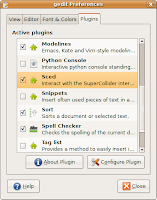

Okay, now we can try the interpreter. Select Tools->SuperCollider Mode from the gedit menu. The SuperCollider output panel will appear with a message that SuperCollider has started. Now type the following code just inside the currently open document:
"Hello, World!".postln;
Make sure that the cursor is on the same line and press CTRL+E. You should see "Hello, World" printed two times in the output window. The string is duplicated because "postln" returned the same string as a value, and the output also prints the results of the evaluated expressions.

If you'd like to get some sound, make sure that JACK is started. If not, start it with qjackctl or the following command:
jackd -d alsa
After JACK has started, select SuperCollider->Start Server from the gedit menu and execute the following code string, just like we did with the "Hello, World" example above:
{SinOsc.ar}.play;
You should hear an annoying beep from your left speaker. Not much, huh? Well, press ESC (Stop Sound) inside gedit for now. And append something like the following code to your document (yes, you can do all the work in the same document):
// This example is a modified patch
// from the SuperCollider book by David Cottle
// You can enable syntax highlighting
// by selecting View->Highlight Mode->Others->SuperCollider
( // press CTRL+E here
{
  RLPF.ar(
    Saw.ar(55),
    LFNoise1.kr([5, 5], mul: 440, add: 880),
    0.1,
    mul: 0.25
  )
}.play;
)
Note the brackets around the actual code. They're used to group code together into "blocks" and execute SuperCollider instructions simultaneously. In this example you will need to press CTRL+E where indicated to select and run our block. Remember, that you can shutdown the sound anytime with ESC! :)

As you can see, we have a Saw oscillator, connected to a resonant low-pass filter (RLPF) here and the cutoff frequency is controlled by an interpolated random value (LFNoise1). You can open reference pages for the respective modules (UGens) by positioning the cursor over them and pressing CTRL+U, but make sure that you install supercollider-doc package to get those.

Well, I hope this tutorial will help you get started with SuperCollider. Make sure you also stop by the SuperCollider website and the wiki for more tutorials and examples.

Friday, May 2, 2008

aoTuV beta5.5

Decided to encode some recently purchased CDs at last, but due to a complete Hardy reinstall last week, I've had to go for some fresh aoTuV vorbis sources and to my suprise there has been a new beta available for quite some time already!

I don't think this version is substantially different from beta5 (aka 4.51), I can't hear any difference between the encoded file and the original at q6 (which is my default quality setting) and both versions produce seemingly identical output to me.

Nevertheless, I've decided to stick with beta5.5 just because it's the latest :) But I couldn't resist building a patched Ubuntu package besides a static oggenc binary, which I've always compiled for this purposes before (simply to keep the system libraries intact).

Just in case anyone's interested in trying beta5.5, the updated libvorbis binaries can be found in my PPA, but the statically linked oggenc 1.2.0 binary is available as well.

Monday, April 14, 2008

apturl in conversations

I've just put together a little patch, that adds apturl support to Pidgin, allowing neat package installation by clicking apturls directly from conversation windows. Here's a screenshot, demonstrating the stuff:


The patch itself is here: https://bugs.launchpad.net/bugs/217611. Binaries are currently building in the PPA. Enjoy :)

Friday, April 11, 2008

SuperCollider for Hardy!

Just a quick notice, that I've updated the SuperCollider binaries for Ubuntu 8.04 (Hardy Heron), that's going to be released later this month. This time, the packages are merged with the original 20060416 version as advised by #ubuntu-motu. Also, the supported architectures are extended to powerpc and lpia.

APT sources.list entries:

deb http://ppa.launchpad.net/artfwo/ppa/ubuntu hardy main
deb-src http://ppa.launchpad.net/artfwo/ppa/ubuntu hardy main


Enjoy!

Friday, January 25, 2008

Sced 0.3 released today!

Okay, the blog is reset, and I have just uploaded the Sced 0.3 tarball to its usual location. This release includes awesome contributions by Eckard Riedenklau and requires gedit 2.20 and gtksourceview 2.0 to run. Enjoy!